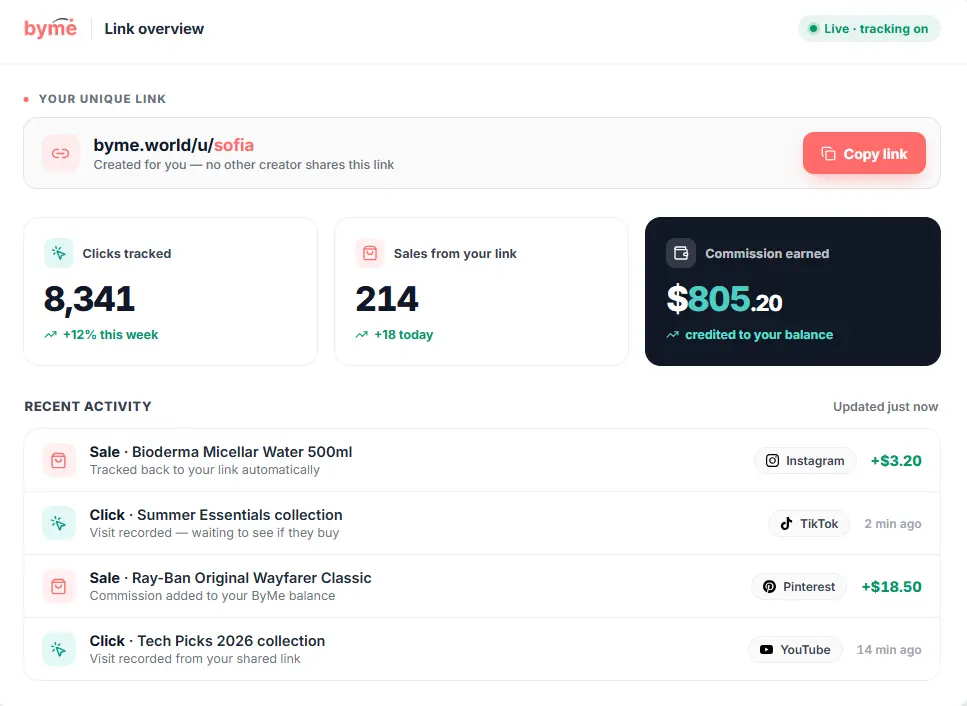
Every time you share a collection or a product, you share a unique link that belongs only to you. Here’s exactly how it works and why it matters for your earnings.
Maria Popescu
Creator Success Lead
What you'll learn
What an affiliate link is and why it's unique to you
How to read your link and what each part means
The difference between a collection link and a product link
What happens from the moment someone clicks to the moment you earn
1
STEP ONE
Understand what your link is.
Your link is different from every other creator’s link. Even if two people share the exact same product, their links are different — so ByMe always knows which sale belongs to who.
It’s unique to you — no other creator on ByMe has the same link
It tracks every click and sale — when someone taps your link, ByMe records the visit. If they buy something, ByMe connects that purchase back to your link and adds the commission to your account
It works automatically — you don’t need to do anything technical. When you copy your link from ByMe and share it, all the tracking happens automatically in the background
It earns you commission — every purchase made through your link earns you a percentage of the sale, credited directly to your ByMe balance
2
STEP TWO
Learn what your link looks like.
Every ByMe link follows the same structure. Here’s how to read it and what each part means.
go.byme.world — the ByMe tracking domain, this is what tells the merchant the sale came from ByMe
Product code — a unique code for the specific product in your collection
Collection code — a unique code that identifies your collection and ties the sale back to you
Example link
go.byme.world/yJkYhfpSTZwrTH
3
STEP THREE
Know the two types of links.
You have two types of links — one for your whole collection and a separate one for each individual product inside it.
Collection page link — takes followers to your full collection page where they can browse all products at once. Best for sharing on social media, your bio, or with people who don’t know what to buy yet. Copy it using the Share button on the collection card
Individual product link — each product inside your collection also has its own unique link. Use this when you want to point a follower directly to one specific product — perfect for recommending in a video or message. Copy it using the Copy link button on the product card
4
STEP FOUR
See what happens when someone clicks your link.
Every euro you earn follows the same journey — from the moment you share your link to the moment the commission lands in your account.
You share — you post your link on social media, your bio, or anywhere else
They click — a follower taps your link and ByMe records the visit
They browse — they land on your collection or the merchant’s product page
They buy — they complete a purchase on the merchant’s site
You earn — commission is added to your ByMe balance automatically
5
STEP FIVE
Know the important rules before you share.
Before you start sharing your link everywhere, there are three things you need to know to make sure your earnings are always tracked correctly.
Only share your own link — never share another creator’s link. Only purchases made through your own link will earn you a commission
Links don’t expire — your affiliate links stay active as long as the collection and product exist. Old posts with your link can keep earning you money over time
Track it in your dashboard — every click and sale from your link shows up in your dashboard in real time, so you always know how your links are performing
Related tutorials
Short, clear, practical guides. Learn how the platform works, how to grow your earnings, and how to manage your collections.